What Is AI Virtual Try-On? How It Works, 3 Approaches and Where Each Fits (2026)

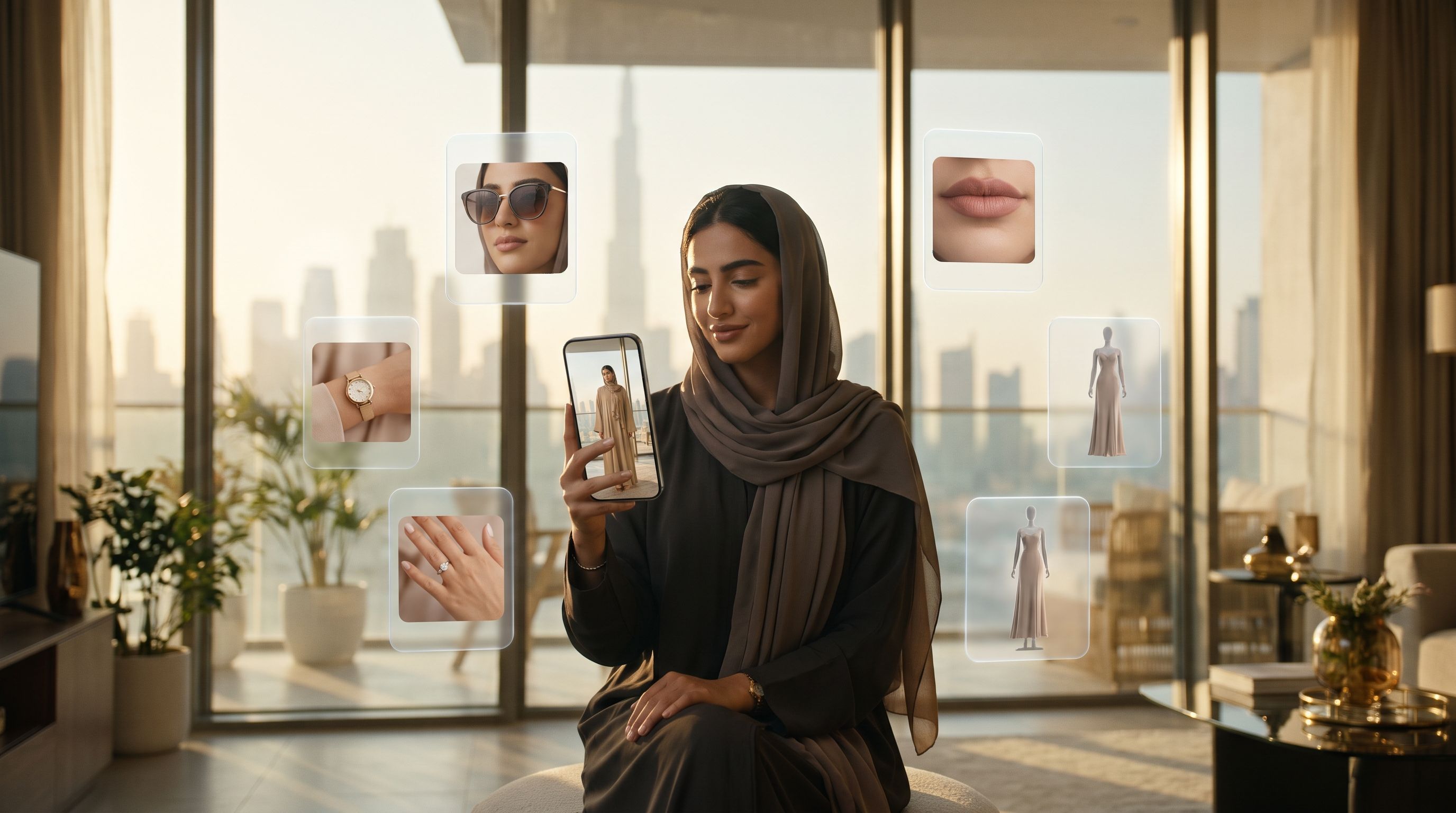
AI virtual try-on is technology that shows a shopper how a product looks on them, or on a model like them, before they buy. It uses a phone camera, an uploaded photo or a 3D model, and AI places the garment, frames, lipstick or ring onto the face or body so it looks worn rather than pasted on.
So what is AI virtual try-on in practice? It is not one tool. It is three different approaches that suit different products: live AR camera try-on, generative photo try-on and 3D garment models. In this guide we explain how each one works, which categories suit which approach (including abayas, eyewear, cosmetics, jewelry and watches), how UAE e-commerce and Shopify brands can use try-on imagery in ads and on product pages, and where the technology still falls short on fit, fabric drape, skin tone and privacy.
In this guide
- What AI virtual try-on means
- How AI virtual try-on works, step by step
- The three approaches compared
- Which approach suits which category
- Using try-on imagery in ads and on product pages
- The limits: fit, fabric drape and skin tone
- Privacy and biometric data in the UAE
- What drives the effort and cost
- Frequently Asked Questions
- Turning try-on into content that sells
What AI virtual try-on means
At its simplest, virtual try-on replaces the question "how will this look on me?" with a picture or a live view that answers it. The shopper sees the product on their own face, their own body, or a model chosen to match their size and skin tone.
The "AI" part does the hard work in the middle. Computer vision finds the face, the hands or the body pose. A model then works out how the product should sit: where frames rest on the nose, how a sleeve falls from the shoulder, how a lip color looks on a particular skin. Older try-on tools used fixed overlays that looked like stickers. Current systems adjust for angle, lighting and movement, and the generative ones can redraw a garment on a body as if it had been photographed there.
Try-on is not a size recommender
People often mix up two things. A size recommender asks for height, weight or past purchases and suggests a size. A virtual try-on shows the look. Some products combine both, but they answer different questions. A try-on image can show that a dress suits you while saying very little about whether a medium will be tight across the shoulders. Keep that distinction in mind, because it explains most of the limits we cover later.
How AI virtual try-on works, step by step
Whatever the approach, most try-on experiences follow the same basic sequence:
- Input. The shopper turns on the camera, uploads a photo, or picks a model from a range of body types and skin tones.
- Detection. Computer vision finds landmarks: eyes, nose bridge and ears for eyewear; lips and cheeks for makeup; wrist and fingers for watches and rings; shoulders, hips and limbs for clothing.
- Understanding the product. The system needs a digital version of the item. That can be a 3D model, a set of flat product photos, or a garment image that a generative model learns from.
- Placement and rendering. The product is aligned to the landmarks, scaled, lit to match the scene and blended at the edges so it looks worn.
- Tracking or regeneration. Live AR keeps the product locked to the face or hand as it moves. Photo try-on produces a new still image or short clip instead.
- Decision. The shopper compares colors, sizes or styles, and either adds to cart or keeps browsing.
The difference between the approaches lies mostly in steps 3 to 5: what the product data looks like, and whether the result is a live view, a generated image or an interactive 3D render.
The three approaches compared
Most try-on products on the market fall into one of three families. Some platforms blend them, but knowing the families helps you judge what you are buying or briefing.
AR live camera try-on
This is the version most people picture: you open the camera and the sunglasses, lipstick or earrings appear on your face in real time, moving as you turn your head. It runs on face and hand tracking plus a lightweight 3D model of the product.
AR is strongest for products that sit on a rigid, well-tracked part of the body: the face, the lips, the ears, the wrist. It is how many beauty and eyewear shoppers already use try-on, and it is the technology behind the AR shopping lenses many people already know from Snapchat. It struggles with loose clothing, because a phone camera cannot easily track a whole body and fabric at the same time.
Generative photo try-on
Here the shopper (or the brand) supplies a photo of a person and a photo of a garment, and a diffusion model generates a new image of that person wearing it. Google has added this style of try-on to its shopping results for some apparel. The result is a still image or, increasingly, a short video clip.
Generative try-on is good at the look of clothing: color, pattern, how a garment reads on a body shape. It does not need a 3D model of every product, which makes it far easier to scale across a large catalog. The trade-off is that the model is predicting what the garment would look like, so small details (a button count, a print scale, the exact drape of chiffon) can drift from the real product.
3D garment and product models
The third approach builds an accurate digital twin of the product: a 3D garment made from the real pattern pieces and fabric properties, or a precise 3D model of a watch or a ring. That twin can be placed on an avatar built from body measurements, rotated in a 360-degree viewer, or rendered into marketing images and video.
3D is the most accurate on construction and the closest to true fit, because the garment is simulated from real dimensions. It is also the slowest to set up per product, since each item needs to be modeled or digitized. That makes it a better match for hero products, high-value items and collections that stay in the range for a long time.
Here is how the three approaches compare on the points that matter when you choose one:
Which approach suits which category
The right approach depends far more on the product than on the platform. A rigid object on a well-tracked body part is easy. A flowing garment on a moving body is hard.
Fashion and apparel
For tops, dresses and outerwear, generative photo try-on usually wins on cost and coverage, because it works from the product photos you already have. Use it to show one garment on several body types and skin tones on the product page. For tailored items where fit drives returns, a 3D garment model built from the pattern gives a more honest picture. Our guide to fashion video ads that show fit, fabric and color covers how to film the details that try-on images still miss.
Abayas and modestwear
Abayas, kaftans, jalabiyas and long modest dresses are some of the hardest items for try-on, and one of the most relevant categories for brands in Dubai, Abu Dhabi and Sharjah. The garments are long, loose and often layered, and the fabric (crepe, chiffon, nida, linen) does most of the selling. Live AR rarely handles this well. Generative try-on can show color, length and silhouette on different heights, which is genuinely useful when a shopper wants to know whether a 56-inch abaya will reach the ankle.
Two rules matter here. First, check every generated image for drape and for embellishment details such as embroidery, beading or lace trim, because these are the parts most likely to be simplified. Second, make sure models are dressed and styled in line with the modesty expectations of your audience, including the hijab or shayla styling you show. A try-on image that looks wrong to your core customer does more harm than no try-on at all.
Eyewear
Eyewear is the most mature try-on category, and live AR is the natural fit. Faces are easy to track, frames are rigid, and the main question (do these suit my face shape?) is exactly what AR answers. Ask whether the tool scales frames to real face width, because a pair that looks right in proportion can still be too narrow in reality.
Cosmetics
Lipstick, foundation, blush and eyeshadow are also strong AR categories, since the product is applied to the face and the tracking is precise. The hard part is color, not placement. A shade has to render correctly on deep, medium and light skin, under warm indoor light and harsh daylight. Test the tool on a real range of skin tones before you put it on your store.
Jewelry and watches
Rings, earrings, necklaces and watches suit AR try-on on hands, ears and wrists, and they suit 3D models even more for marketing. A ring needs to show its true scale on a finger, and a watch needs the right case size on a wrist. Sparkle and metal reflections are where AI shortcuts show, so the product must stay true to the real piece. We go into this in detail in our post on AI video production for jewelry brands, and you can see how we approach the category on our jewellery video ads page.
This matrix sums up the best starting point for each category and the one thing to check first:
Using try-on imagery in ads and on product pages
Most articles treat virtual try-on as a widget on the product page. For many UAE brands, the bigger opportunity is the content it produces. The same technology that shows one shopper a dress can show your whole range on a dozen models, in several sizes and skin tones, without booking a studio for every color.
On Shopify product pages
On a Shopify store you can use try-on in two ways. The first is an interactive try-on app on the product page, which suits eyewear, beauty and jewelry. The second, which works for almost any category, is to use generated try-on images and short clips as part of the product gallery: the same abaya on a petite and a tall model, the same lipstick on three skin tones, the same watch on a slim and a broad wrist.
The second route needs no app at all and adds very little load time if you compress the files properly. It does need careful labelling, because shoppers should know when they are looking at a generated image. Our guide on how to design a Shopify store that sells covers gallery order and product page layout, and our Shopify store team in Dubai builds stores that handle bilingual galleries and video without slowing down.
Try-on images also help search. Descriptive file names, alt text in English and Arabic, and product schema give search engines and AI assistants more to read. If organic discovery matters to you, that is part of what our SEO and AI search service looks at.
In Meta, TikTok and Snapchat ads
Try-on content works well in paid social because it answers the question the ad raises. A shopper scrolling Instagram sees an abaya on a model with their body shape, or a lipstick on their skin tone, and the doubt that stops a click goes down. A practical workflow looks like this:
- Pick hero products. Start with three to five items that already sell, so you test the format rather than the product.
- Choose the approach. Generative photo for apparel, AR captures or 3D renders for eyewear, beauty, jewelry and watches.
- Generate variants. Make each product on several models, sizes and skin tones, in 9:16 for Reels, Stories and TikTok and 4:5 for the feed.
- Animate the best stills. Short motion (a turn, a walk, a hand raising a cup) makes try-on images feel real. Our explainer on what AI image-to-video is covers how stills become clips.
- Check against the real product. Compare every frame with the physical item for color, length, details and logo placement.
- Test as creative variants. Run try-on ads against your existing product ads and compare click-through and purchase rate.
Here is a labelled, hypothetical test to show how the budget side works: a Dubai modestwear brand puts AED 300 a day behind each of four ad sets for seven days, two with studio images and two with try-on variants on three body types. That is AED 8,400 in ad spend, enough to see which creative earns cheaper clicks and purchases. The numbers are an example, not a benchmark.
If you want to see how we plan, produce and run creative tests like this end to end, our process page walks through each stage.
The limits: fit, fabric drape and skin tone
Virtual try-on is useful, but it is not a fitting room. Be clear-eyed about where it falls short, both for your customers and for your own claims.
Fit accuracy
Most try-on shows the look, not the fit. A generative image will happily put a size small dress on any body and make it look good, because the model is drawing a pleasing image, not simulating fabric tension. Only measurement-based 3D systems get close to real fit, and even they depend on accurate body data. Never let a try-on image imply a fit promise your size chart cannot keep.
Fabric drape
Drape is how fabric hangs and moves. Stiff denim, soft jersey and flowing chiffon behave completely differently, and that is exactly where generated images take shortcuts. Long, loose garments such as abayas and kaftans expose the problem the most. Shoot at least one real video of the product moving and use it alongside any generated images, so shoppers see the true fabric.
Skin tones and undertones
Many models still perform better on some skin tones than others. For cosmetics, a foundation shade can look right on light skin and ashy on deep skin. For jewelry, gold can read differently against different undertones. Test across the range of your actual customers. In the UAE, that means a genuinely wide range.
This is the wider problem we cover in our guide to AI ads versus the real product: generated content drifts, and the fix is a checking step, not a better prompt. The table below pairs each limit with a practical fix:
Privacy and biometric data in the UAE
Try-on tools often process the most personal data a shopper can give you: their face, their body shape and sometimes their measurements. Face geometry and body scans can count as biometric data, so treat them with care.
In the UAE, Federal Decree-Law No. 45 of 2021, the Personal Data Protection Law, sets the rules for processing personal data. The UAE government summary of its data protection laws explains that the law generally prohibits processing personal data without the owner's consent, gives people the right to correct and restrict processing, and sets requirements for sending data across borders. The DIFC also has its own data protection law. The federal law treats biometric data as a category of sensitive personal data, which raises the bar further. This is general information, not legal advice, so check your setup with a qualified adviser.
Before you add a try-on feature, get clear answers to these questions from whoever provides it:
- Where does the image go? Is it processed on the device or uploaded to a server, and in which country?
- How long is it kept? The safest answer is that photos are deleted right after the try-on.
- Is it used for training? Shopper photos should never train the provider's models without explicit consent.
- How is consent shown? A clear notice before the camera opens, in English and Arabic, not buried in the terms.
- Is there a no-camera option? Offer model-based try-on for shoppers who do not want to share a photo.
For try-on imagery used in ads, the same care applies to models. If you generate content from a real person's photos, get written consent that covers AI use, the channels and the duration.
What drives the effort and cost
We do not publish prices, and try-on costs vary too much between routes to give a useful range. What we can tell you is what moves the effort up or down:
- The approach. Generative photo try-on works from existing product photos. AR needs a 3D asset per item. True 3D garments need patterns or scans for each piece.
- Catalog size. Ten hero products and a thousand-SKU catalog are different projects.
- Category difficulty. Rigid items such as frames and watches are easier than flowing fabric or fine jewelry.
- Accuracy needs. Ad imagery can tolerate a stylized look. Product pages that imply fit need far more checking.
- Variants. Every extra body type, skin tone, size and aspect ratio multiplies the outputs to review.
- Integration. A gallery of generated images needs no app. An interactive try-on needs setup, testing on many devices and privacy work.
For most brands we suggest starting small: a handful of hero products, generated try-on content for ads and galleries, and a real test before any bigger build.
Frequently Asked Questions
What is AI virtual try-on in simple terms?
AI virtual try-on is technology that shows how a product looks on you, or on a model like you, before you buy. It uses a live camera, an uploaded photo or a 3D model, and AI places clothing, glasses, makeup or jewelry onto the face or body so it looks worn. The three main approaches are live AR, generative photo try-on and 3D garment models.
How accurate is virtual try-on for clothing fit?
Most virtual try-on shows the look of a garment better than its fit. Generative images tend to make every size look flattering, because the model is drawing an appealing picture rather than simulating fabric tension. Measurement-based 3D garment systems get closer to true fit, but they rely on accurate body data. Treat try-on as a style preview and keep fit guidance in the size chart.
Does virtual try-on work for abayas and modestwear?
Yes, with care. Generative photo try-on can show color, length and silhouette on models of different heights, which helps shoppers judge an abaya or kaftan. Live AR rarely handles long, loose garments well. Check every image for drape and embellishment details such as embroidery or beading, and style models in line with the modesty expectations of your audience.
Is virtual try-on safe for my privacy?
It depends on the provider. Try-on can involve face images and body shape, which may count as biometric data. Look for a clear consent notice, processing on the device or prompt deletion of photos, and a promise that your images are not used to train models. In the UAE, the Personal Data Protection Law requires consent for most processing of personal data.
Can I add virtual try-on to a Shopify store?
Yes. You can install an interactive try-on app on product pages, which suits eyewear, beauty and jewelry, or you can add generated try-on images and short clips to the product gallery for almost any category. The gallery route needs no app, but label generated images clearly, compress the files so pages stay fast, and check every image against the real product.
Can I use virtual try-on images in my ads?
Yes. Try-on images and clips work well in Meta, TikTok and Snapchat ads because they show the product on people who look like your customers. Generate variants by body type, skin tone and size in 9:16 and 4:5, check each one against the real product, and test them against your current ads as separate creative variants.
Turning try-on into content that sells
AI virtual try-on is three technologies under one name, and the right one depends on your product: AR for faces and wrists, generative photo try-on for catalog-scale apparel and modestwear, and 3D models for high-value items that need true detail. Whichever you choose, the content it produces can work as hard in your ads and product galleries as the widget does on the page, as long as every frame stays true to the real product.
We are an AI video and ad production team in Dubai with human creatives checking every output. If you want try-on imagery and video for your UAE store or campaigns, book a call and get a quote and we will suggest the right approach for your range.